BigOven 1.8.992
Updated on 01 Aug 2011
By Anthony Buckner
By Anthony Buckner
Specifications
License:
Shareware (Free to try)
Updated:
Downloads:
1990
Platform:
Windows 95/98/Me/NT/2000/XP
Publisher:
Lakefront Software, Inc.(more)
Website:
User Reviews:
Other versions:
1
Do you like
BigOven?
BigOven?
FindMySoft Editor's Review
BigOven – Easy to Use Recipe Database
BigOven.com is a website created by Steve Murch that focuses on one crucial question: “What’s for dinner.” As Steve Murch himself explained, BigOven.com is a “place for you to go to get unstuck for dinner.” BigOven.com offers computer users all over the world the chance to visit a website that offers recipes, meal ideas, and a place for people to meet and talk about food.
But that is not all BigOven.com has to offer – it also offers computer users all over the world a handy, useful application called BigOven (what else). To start using the application you must first download it. In this regard you must know that BigOven weighs in at some 50MB. This means that even on a high-speed connection, it may take a while for the download to complete.
The upside is that once the download is compete, the next step, installing the application, goes along smoothly and rapidly – definitely a lot faster than waiting for a 50MB download to complete on a less than spectacular internet connection. Speaking of installing applications, this one will work without a problem on any version of the Microsoft-developed Windows operating system. This includes the old but popular Windows XP, the much avoided Windows Vista, and the latest iteration, the biggest and best, Windows 7.
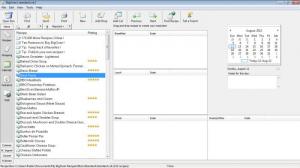
What does the BigOven do? I am glad to report that it works very well as a recipe database. The application’s nice looking interface presents a long list of recipes. The user interface also presents meal planning, shopping lists and nutritional values. With BigOven you can select which recipes you would like to try – and the application will automatically create shopping lists for you. You can get more recipes from the web as BigOven comes with a browser that focuses on this specific task. Recipes that you import can be edited. To set up BigOven as you see fit, the application comes with a good selection of configuration options.
For the BigOven.com fan, this application is a definite must have. Not so much for the computer user that doesn’t want to register to BigOven.com and doesn’t want to spend money on such an application.
There’s also a BigOven application for the iPhone and for the iPad.
Pros
Cons
But that is not all BigOven.com has to offer – it also offers computer users all over the world a handy, useful application called BigOven (what else). To start using the application you must first download it. In this regard you must know that BigOven weighs in at some 50MB. This means that even on a high-speed connection, it may take a while for the download to complete.
The upside is that once the download is compete, the next step, installing the application, goes along smoothly and rapidly – definitely a lot faster than waiting for a 50MB download to complete on a less than spectacular internet connection. Speaking of installing applications, this one will work without a problem on any version of the Microsoft-developed Windows operating system. This includes the old but popular Windows XP, the much avoided Windows Vista, and the latest iteration, the biggest and best, Windows 7.
What does the BigOven do? I am glad to report that it works very well as a recipe database. The application’s nice looking interface presents a long list of recipes. The user interface also presents meal planning, shopping lists and nutritional values. With BigOven you can select which recipes you would like to try – and the application will automatically create shopping lists for you. You can get more recipes from the web as BigOven comes with a browser that focuses on this specific task. Recipes that you import can be edited. To set up BigOven as you see fit, the application comes with a good selection of configuration options.
For the BigOven.com fan, this application is a definite must have. Not so much for the computer user that doesn’t want to register to BigOven.com and doesn’t want to spend money on such an application.
There’s also a BigOven application for the iPhone and for the iPad.
Pros
- Easy to use
- Nice interface
- Import recipes from the web
- Automatically creates shopping lists
Cons
- Free to use only during the 30-day trial period
- Nag screen
- Register BigOven.com to get full use of the application
- When you select the metric system, the app displays values in milliliters
- Puts a BigOven.com shortcut on the desktop (which I found annoying)
- The 50MB download may take a while to complete
System Requirements
Windows 95 or higher
Do you like BigOven
Advertising
Popular News
The free AboutOne app is currently exclusive to Windows Phone. The app is available for free in the Markeplace.
Google rolled out Chrome 19 to the Stable Channel. This version fixes some security problems and adds tab syncing capabilities.
BigOven Awards
BigOven Editor's Review Rating
BigOven has been reviewed by George Norman on
05 May 2010. Based on the user interface, features and complexity, Findmysoft has rated
BigOven
4
out of 5 stars, naming it ExcellentYour Rating
Top Downloads
2.
Opera5.
Trillian8.
AIM9.
Skype10.
Ad-Aware12.
Nero13.
Google Earth14.
Picasa15.
Winamp16.
iTunes17.
RealPlayer18.
uTorrent19.
eMule20.
WinRAR21.
BitComet22.
WinZip23.
Shareaza24.
CCleaner25.
Recuva26.
Tweak UI27.
CuteFTP Home29.
Adobe Reader30.
NewsPiperBecome A Fan!
Link To Us!
BigOven
HTML Linking Code
HTML Linking Code
Latest Reviews